Kargo Integration Documentation
Kargo supports several integration methods for moving data into and out of the platform. Choose the one that best fits your systems and operational needs.
Data into Kargo
- Flat File Integration — Our quickest, simplest path. Send a flat file of expected shipments via email or SFTP and Kargo automatically creates scheduled shipments to validate.
- REST API — A REST API for programmatic access to platform resources, with an interactive Swagger reference for creating and updating shipments, orders, and order items.
- Unified Endpoint API — Send an arbitrary JSON document to a single endpoint. Kargo translates the request into whatever operation is needed based on the payload, making it ideal for accepting a generic feed from a customer's API.
Data out of Kargo
- Webhook (Push) API — Kargo pushes data back to your WMS as shipments and pallets are processed, at both the shipment and pallet level.
- File Transfer — At the end of a shipment, Kargo can transfer a file in CSV, EDI, or text format to a customer SFTP directory or via email.
Legacy
- GraphQL API — Our original integration method, maintained for existing integrations.
Example Standard API Integration
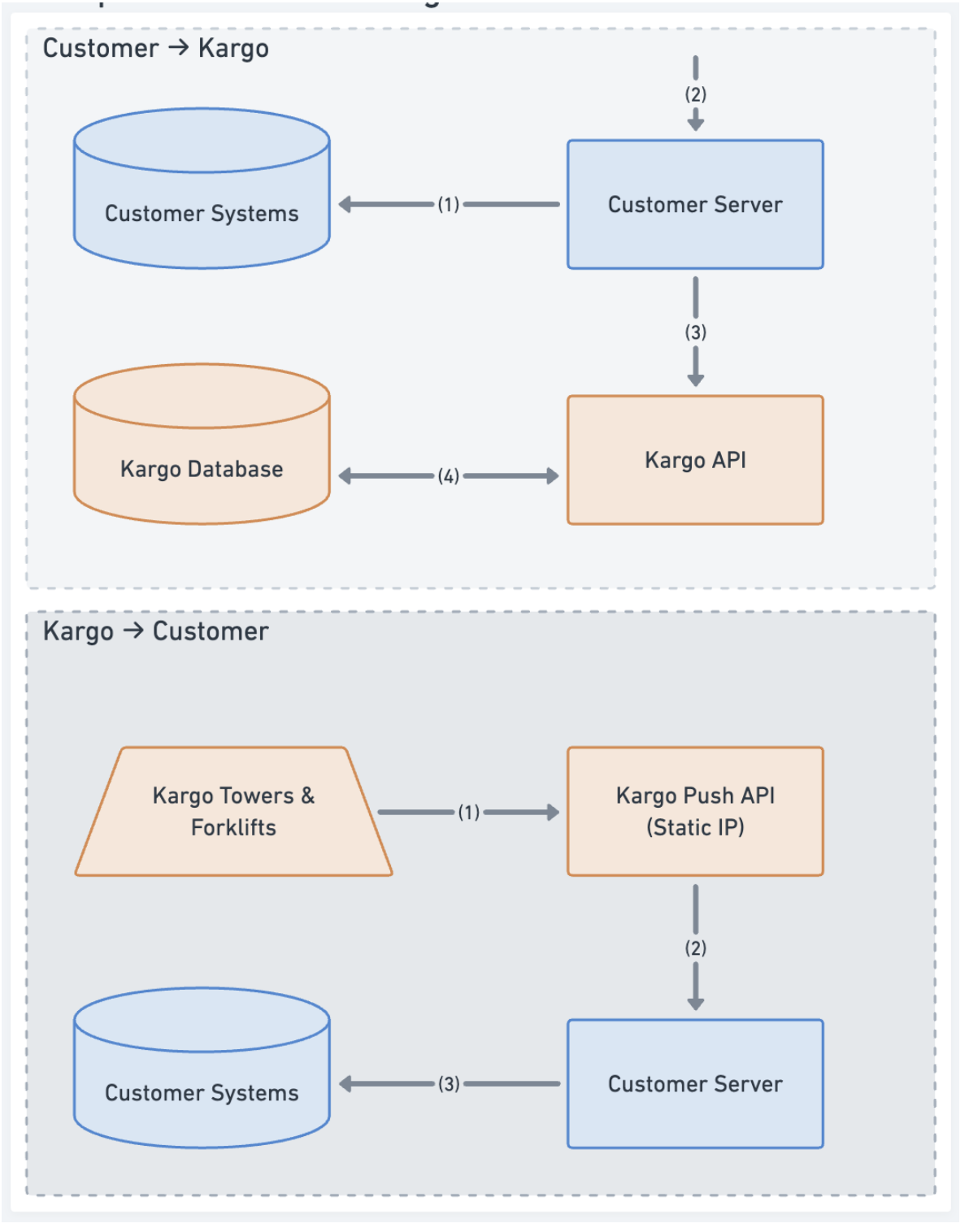
Customer → Kargo
- Customer has a server which can combine information from all their systems to create the necessary info for the Kargo API request (e.g., Order Items, Order #, Scheduled Departure).
- Customer decides on a trigger to send to the Kargo system, which could be a batch of new orders, or even item by item as they’re picked.
- Customer makes an HTTP POST call using a Bearer Token to the GraphQL API to set up a scheduled shipment and attach an order to it.
- Kargo persists the information in its database so it can display it on the dashboard and use it for validation and more.
Kargo → Customer
- Kargo gathers all necessary information from its devices and once it has aggregated it all, creates a trigger to push to the customer. This can be on the pallet or shipment level.
- Kargo issues an HTTP POST call to an endpoint exposed by the customer as detailed in the documentation. This contains information about the labels for each pallet scanned.
- Finally, the customer parses the JSON received from the Kargo Push API and writes it back into their system.
Postman Collection
Download the Kargo public GraphQL Postman collection to quickly get started testing the API:
Download Postman Collection